
Should I pay to be on LinkedIn Premium?
You want to start using LinkedIn proactively to enhance your career and personal brand, but should you pay to use it? This is one of my most frequently asked questions! Read on to find out what I think about whether you should upgrade to one of the paid versions of LinkedIn…
Ok, so, spoiler alert. I don’t think there is a one size fits all answer here.
A lot will depend on your budget, your goals for using LinkedIn, and the time you have available to optimise the features that paying for it will give you.
Instead I’ll share the features LinkedIn Premium gives you, and my opinion on how useful each of these are so that you can make an informed decision as to whether upgrading might be right for you.
First though, let’s explore what I mean by LinkedIn Premium.
What Is LinkedIn Premium And How Do I Know If Someone Is Using It?
LinkedIn Premium involves making a monthly (or annual) payment in return for additional platform features. We’ll explore what those features look like in a moment, but it’s clear LinkedIn are trying to push more and more people into this model by limiting some of the great features you could historically have for free.
You can sign up very easily to LinkedIn Premium, and you don’t have to commit to a time period, you can cancel within a couple of months if you like.
The easiest way to recognise a personal profile is using LinkedIn Premium is by observing the brown LinkedIn logo under the personal profile banner image on the top right of the profile, as illustrated here in this screenshot from MY profile.
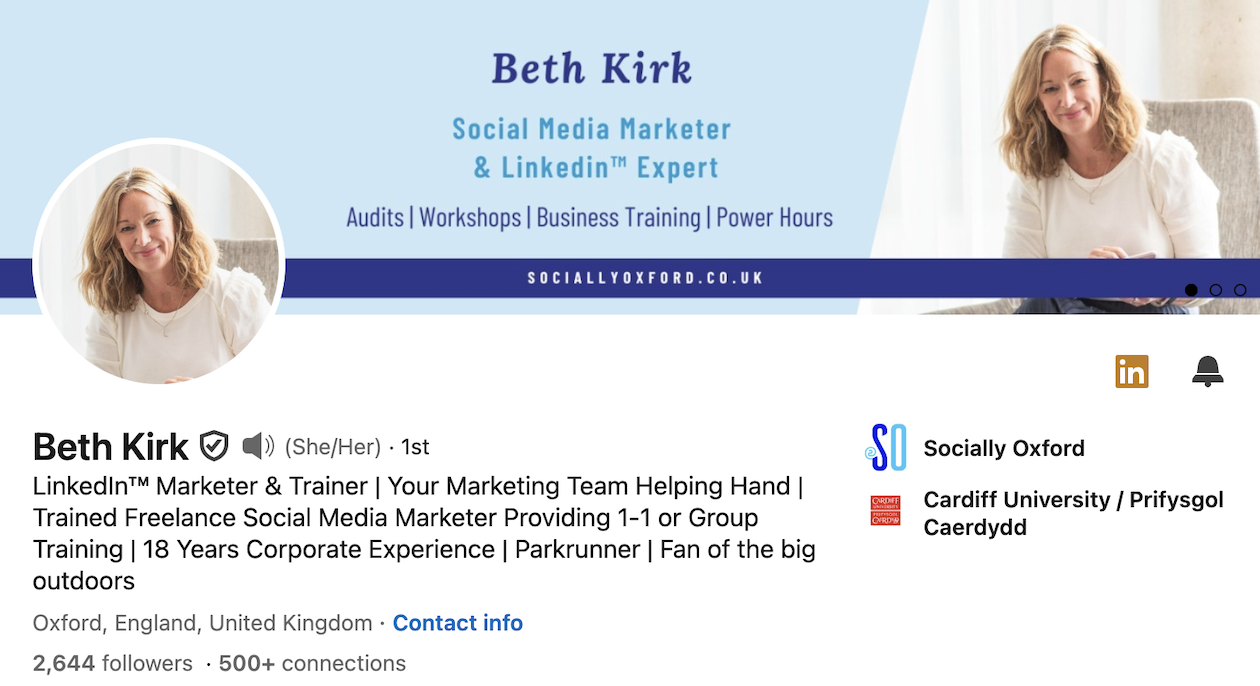
You’ll only see this on a profile if they’ve signed up to a paid version of the platform. However, you don’t have to display this icon on your profile if you don’t want to, so it’s possible that someone might be using the paid version of LinkedIn and you wouldn’t know about it.
What are the different types of LinkedIn paid for subscriptions?
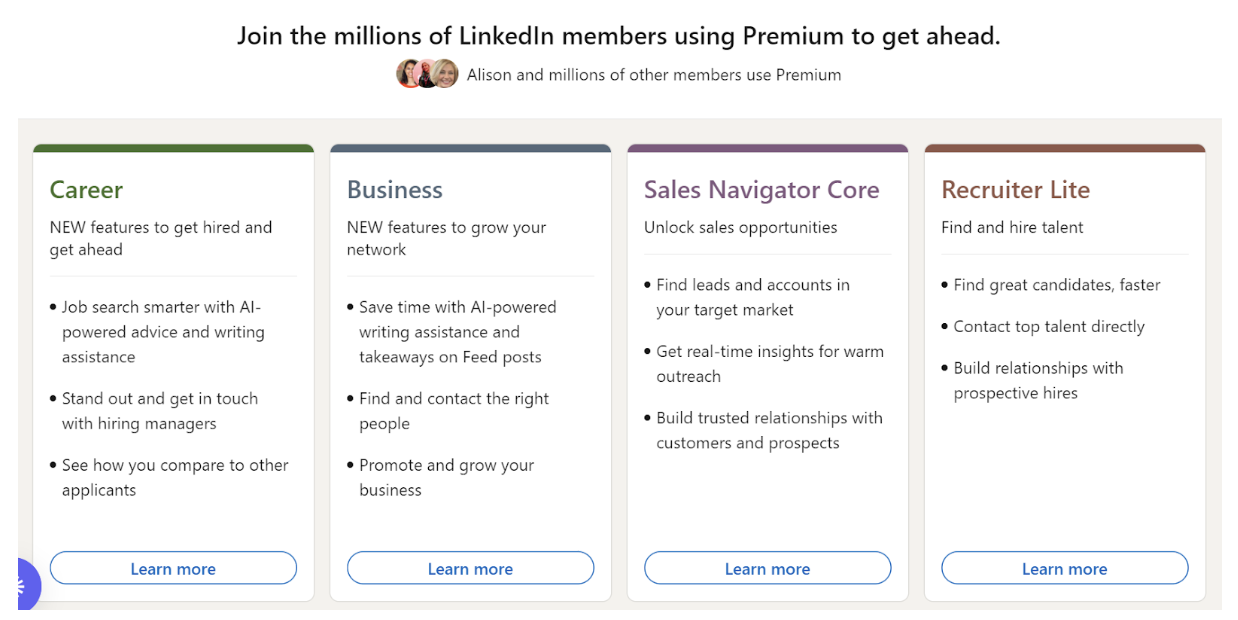
There are different types of paid LinkedIn, so you’ll need to choose the one that’s best for you and your business. I’m currently using the LinkedIn Business option, but you can see the headline of each different paid option below. Take some time to investigate each option and decide what’s right for you and your budget.
It’s also worth knowing that you get the first month of LinkedIn Premium for free. So if you’d like to test the features it gives you before committing to payment, dedicate some time to it and use the features for a month before cancelling. Be aware you can only use this free month once, and don’t forget to diarise and cancel it before your payment is taken.
Premium features which help grow your LinkedIn network
So, what features will you get for paying for LinkedIn Business? Read on to find out what features this will give you and my view on how useful they are to the LinkedIn user….
Paying for LinkedIn Premium Business allows you to send personalised connection requests to other individuals on LinkedIn. This is one of my favourite LinkedIn premium features after the platform started limiting how many of these you could send on the free version. I do believe this feature supports you in proactively growing your network in a professional and authentic way.
Even though these messages are limited in character length, you’ll be able to send multiple monthly personalised connection requests to people you’d like to connect with on LinkedIn, which is a proven strategy for increasing the chances of them accepting your connection request.
Using this feature means you can send personalised message requests to people you’d like to have in your network, explaining why it might be mutually beneficial for them to accept your connection request.
You’ll also get a chance to send a number of LinkedIn Inmails per month. Inmails allow you to directly message another LinkedIn member that you’re not already connected to. If you have a free account, you can usually only directly message LinkedIn members that you’re connected to, unless the individual has an Open Profile (another premium feature), allowing anyone to message them.
The people who viewed your profile feature
A highly useful feature in my opinion. As a free user LinkedIn limits your knowledge of who has visited and viewed your profile by shading out their names. On the paid version you see the full list, which means that you can proactively reach out and ask people what their interest was in your profile, with the aim of starting business conversations and building a relationship.
Proactively growing your network on LinkedIn
Paying for LinkedIn premium will also give you deeper search options on the platform to find the right people to connect with. You’ll be able to browse and visit more LinkedIn profiles in a day without being restricted (on the free version of LinkedIn you’ll get limited profile browsing).
For those of us looking to grow our networks, this is an invaluable feature and enables a more targeted approach to network growth over a shorter period of time.
Paying for LinkedIn premium will also get you a custom call to action link in your profile.
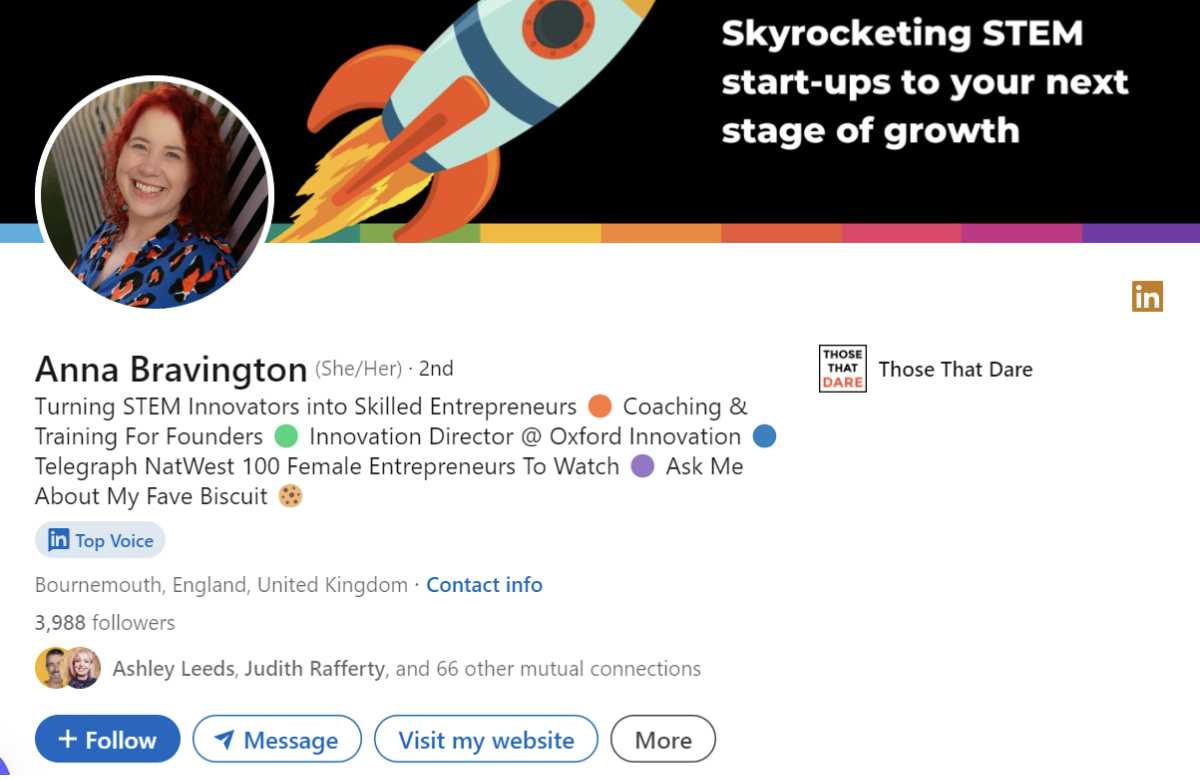
This is one of the top features on LinkedIn premium in my opinion. You’ll have the option to add a clickable call to action button on your profile.
For a business owner this can be a link to your website, email sign up link or to helpful content that attracts your ideal client. Here’s an example from Anna Bravington’s profile where her button is activated with “Visit my website”…
You’ll also get the opportunity to set up and automate a direct message reply. Useful for when you want to acknowledge someone’s message and highlight you’ll get back to them when you’re active on the platform for example.
Have an Open Profile on LinkedIn
If you’re paying for LinkedIn you can also adjust your profile settings to allow others to message you, even if you aren’t connected to each other. This is an interesting feature and one I haven’t switched on, as if I’m honest, I do not want an influx of people I am not connected to trying to sell me something.
This type of behaviour does happen on LinkedIn unfortunately, so do be mindful of that if you decide to use it.
Access to AI features
Paying for LinkedIn will also give you access to the AI tools LinkedIn has developed to help you create a standout LinkedIn profile and share content more easily. I can honestly say I have barely used these. I personally enjoy writing my own posts and crafting my own profile. If you’re a big fan of using AI, you might however find these tools beneficial.
Develop your skills and knowledge with access to LinkedIn Learning
Finally, paying for a premium version of LinkedIn will also give you access to LinkedIn Learning – a learning library resource with (at the time of writing) over 21,000 courses on every professional subject, skill and topic.
The quality of these learning courses can vary, so make sure you watch trainings from well qualified instructors. I’ve learnt from CIM qualified marketer and LinkedIn trainer Luan Wise, who has created some great quality training courses.
Does paying for LinkedIn premium give me better reach with my content on LinkedIn?
Having previously spent a year using premium features, and then switching back to the free version of LinkedIn, I have not seen any change in the reach of my content! I do think that the features it gives you are highly useful, and in particular, the ability to send personalised connection request messages to support growing your network.
I do also believe you can have a great presence on LinkedIn without paying, for now at least.
I hope this blog has helped you make an informed decision as to whether you decide to move to the paid version of LinkedIn. I’d love to know if you found it useful? Do come and tell me on LinkedIn, or if you’d like support with developing a LinkedIn strategy on either the paid or free versions then find out more about my services here.
