

Many of us choose to career pivot for different reasons. You might be looking for a more flexible career (for family reasons for example), or you may just be totally over what you’ve spent 15-20 years doing for a living. The latter being fairly common!
Whatever your reasons, the career world has significantly changed and it’s now completely acceptable (and common) for career pivots to take place along the way of our working life, especially so for women.
It’s also very easy to get stuck around how to communicate a career pivot, particularly on LinkedIn.
Having trained (literally) hundreds of women on how to use the LinkedIn platform, I know that many find it a challenge to feel confident sharing content on the platform, let alone broadcasting a career pivot with their network.
Cries of “how can I communicate my new thing on the platform and my profile without it looking odd to my network?” have been shared on many of my training sessions. Particularly when the career change is something vastly different to the previous career.
I love this question, because it’s so much easier than you think to do, but, like many things with LinkedIn, it’s not something they help you navigate! However I’ll try my best to help you do that here…
Communicating Career Pivots Professionally on LinkedIn
Let’s take a scenario.
“Emma” has 30 years of experience as a business consultant. Emma is tired and exhausted with this career, and for various reasons wants to career pivot into something which gives her greater flexibility with her family and feels more personally rewarding. She plans to pivot into becoming a yoga instructor and wellbeing coach.
You’d probably agree that the two careers are vastly different!
Emma has an established profile on the platform with connections related to her career in business, which she no longer feels are relevant. She hasn’t communicated anything about her career change through her content to her existing connections, and feels paralysed about what to do next.
Making a huge announcement that she suddenly has a new career also feels scary and daunting! What if she gets judged by past colleagues?
My first piece of advice is always to work on your mindset first. Career changes are common and you should feel proud of what you are achieving. However I’m not a mindset coach and will leave any further advice to the experts in that area and move on to the LinkedIn profile tips…
7 Tips For Communicating A Career Pivot On LinkedIn
So, back to LinkedIn. How can you start to communicate your career change in a way you feel comfortable with and looks natural to your network?
- Update your LinkedIn headline! This important section of your profile can say a number of things about you (the character limit at the time of writing stands at 220), not just one thing. You can reference your past career experience as well as your future, so go ahead and feel free to mention and talk about what you are retraining into.
- Why not update your LinkedIn profile imagery to illustrate your passion or enthusiasm for a new career? The LinkedIn cover (or banner) image space is heavily underutilised on the platform and can say so much about you.
- Talk about your career change in your About section! Tell a story about why you are changing career. Why are you doing this and when was the pivotal moment you decided you wanted to do it? Everyone loves to read a story….
- Add your new skills and training to your profile! Many people don’t know you can add up to 50 skills on the LinkedIn profile – make sure your new skills are there so that you turn up in search results by potential employers or recruiters. Make sure your new skills are reordered correctly so that your new skills are highlighted on your profile.
- Training courses can also be added to your profile, and of course you’ll want to add a new employment to your profile if you have secured it, making sure you also include the skills for the role.
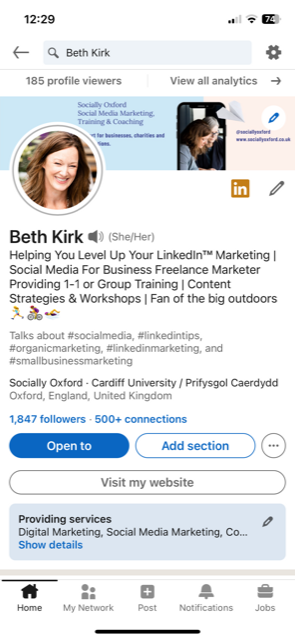
- Why not update your LinkedIn audio recording, saying who you are and what career you are moving into? You can access your audio recording from the LinkedIn mobile app. Tap the pencil on the right underneath your cover image as you see here…..
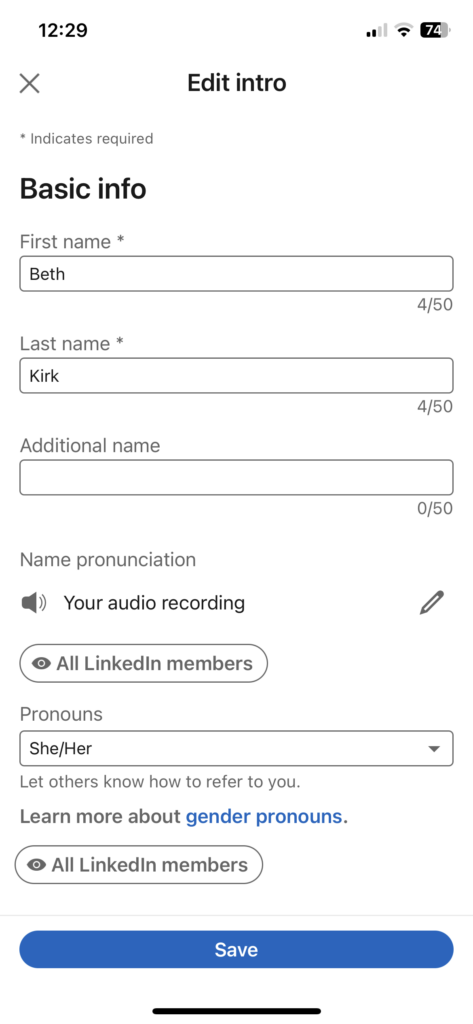
Then tap the pencil to the right of Your Audio Recording, and re-record away! You have 10 seconds to say your thing….
7. Finally, communicate your career pivot by sharing content about it! Let your network know your reasons for change and take them on a journey with you as you move into your new career. There are multiple ways to share content powerfully on LinkedIn, my Content With Confidence package might be helpful if you need support. Find out more about that here.
Finally, one BONUS tip I will leave you with.…
Many people ask me about their existing connections when making a career pivot. Should they create a new profile? Or disconnect with everyone from their existing network?
The answer to this is a firm no! Always keep your existing connections. What’s important to remember is that they may still need you in your new career capacity, or they may know someone else who needs you. Word of mouth is the best recommendation we can all receive, right?
Remember that existing networks can be powerful (my very own past corporate network has brought me work several times in my small business career), so don’t be tempted to create a new LinkedIn profile. Keep the one you have and start to build new connections in your new field of work.
Make Updating Your LinkedIn Profile A Monthly Business Task
Once you’ve made all these personal profile changes it’s important to keep updating your profile as your new career establishes itself.
You may undertake new training, complete work experience or get a recommendation for your new skills. Don’t forget to keep adding all this information to your LinkedIn profile, and finally, remember to share your career wins! You’ll want to ensure you’re getting visible on LinkedIn now you’ve learnt how to adapt your profile in order to reap all the benefits LinkedIn offers. Why not head here to find out how I can help you achieve this.
I hope you found this blog useful. Do come and let me know on LinkedIn here. As always, thanks for reading!
